How to Download Pinterest Videos in 4K Quality (The Honest Guide)
Yes — you can download Pinterest videos in 4K quality, but only when the creator actually uploaded the video in 4K. Here is the honest truth most downloader sites will not tell you: Pinterest compresses nearly every upload, and the vast majority of video pins are stored at 720p or 1080p. No tool on earth can turn a 1080p source file into genuine 4K. What a good downloader can do is grab the highest-quality version Pinterest has — the untouched source file, with no extra compression, no watermark, and the original audio intact.
That is exactly what this guide covers. You will learn how to download Pinterest videos in 4K quality (or the highest resolution available for each pin) on iPhone, Android, and desktop, how to tell whether a pin is actually worth downloading, and how to avoid the traps that leave you with a blurry, pixelated file.
The whole process takes less than a minute: copy the pin link, paste it into a quality downloader, pick the highest resolution option, and save the file. Let us walk through each step — plus the quality secrets most guides skip.

Can You Really Download Pinterest Videos in 4K Quality?
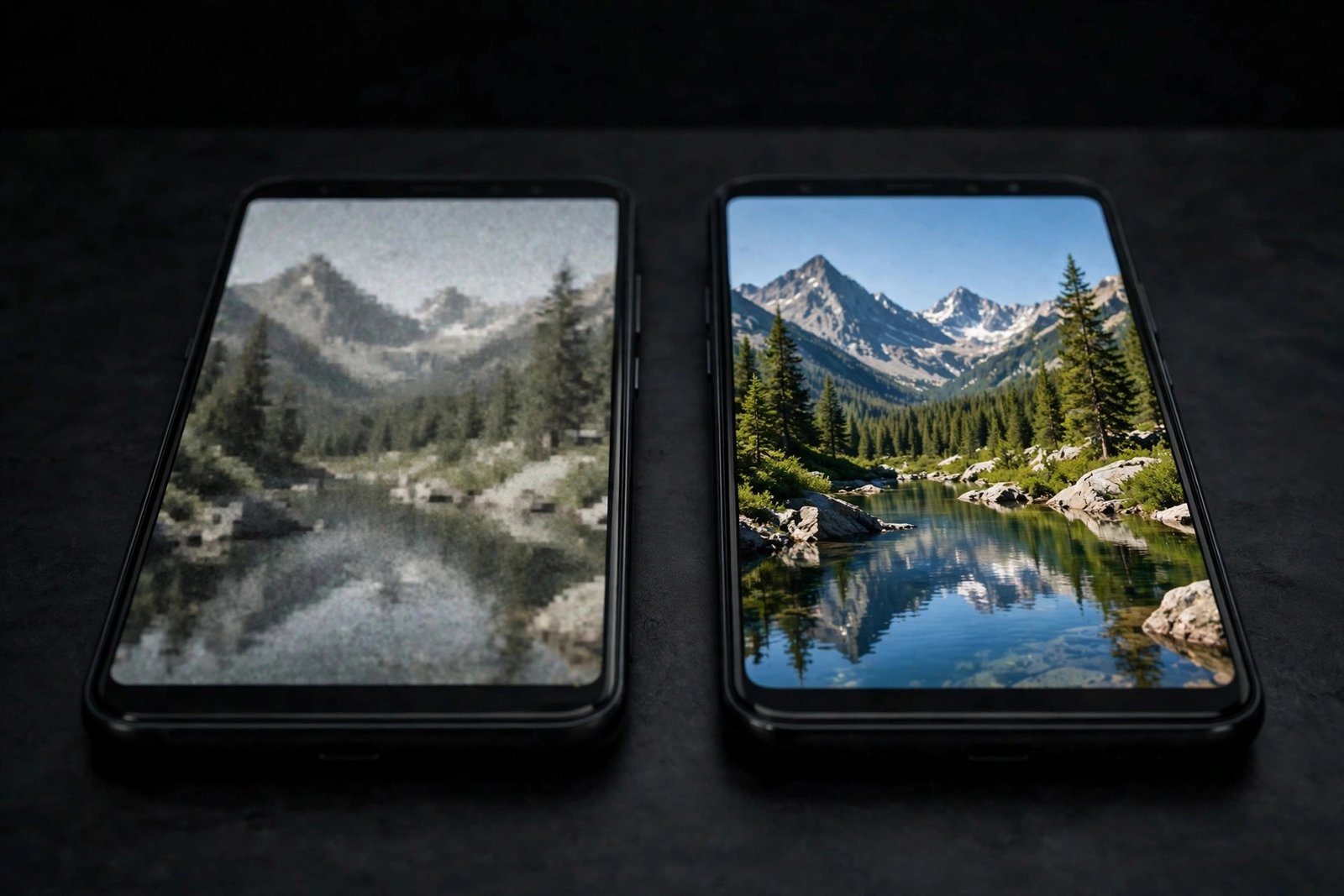
Let us start with the part other guides gloss over. Pinterest is built for fast scrolling on phones, not for pristine cinema playback. Every video uploaded to Pinterest gets compressed and re-encoded, and most pins are served at 720p HD or 1080p Full HD. True 4K files (3840 × 2160 pixels) are rare on Pinterest, because the platform downscales uploads to keep loading times snappy on mobile data.
So what does a “4K” download button actually mean? It means the downloader is offering you the highest-resolution version Pinterest has for that pin. If the creator uploaded a 4K master and Pinterest kept it, you may genuinely get a 4K file. If the original was 1080p, an honest tool will show 1080p as the top option — and any site that claims 4K on every single pin is either upscaling or exaggerating. Nobody can create pixels that were never there. Upscaling makes files bigger without making them sharper.
Here is a quick reality check you can do before downloading anything: open the pin on a desktop and watch it in full screen. If it looks crisp there, the source is good and your download will be too. If it looks soft or blocky even on Pinterest itself, your saved file will look exactly the same — because you are getting the source file, not a remaster. The goal is always to capture the best version that exists, not to chase a label.
How to Download Pinterest Videos in 4K Quality on Any Device
The method is the same on every device, and it takes about 30 seconds. No app to install, no account to create.
Step 1: Copy the Link of the Video Pin
- Open the Pinterest app or pinterest.com and find the video you want.
- On mobile, tap the three dots or the share arrow on the pin and choose Copy Link.
- On desktop, copy the URL from your browser’s address bar, or click Share and copy the link there.
- Both full pinterest.com/pin/… links and short pin.it/… links work fine.
Step 2: Paste the Link Into a Quality Downloader
- Open a free Pinterest video downloader in your browser.
- Paste the copied link into the input box and hit the download button.
- Wait a few seconds while the tool fetches every video file Pinterest has for that pin.
Step 3: Choose the Highest Available Resolution
- You will see a list of quality options — this is the most important moment.
- Always pick the highest resolution shown. That might be 4K, 1080p, 720p, or lower, depending on the pin.
- If only one option appears, that is the only version Pinterest stored — take it.
- Choose MP4 as the format for the widest compatibility (more on that below).
Step 4: Save the File and Check It
- Tap or click download and let the file save to your device.
- On iPhone, the file usually lands in the Files app first; on Android and desktop, it goes to your Downloads folder.
- Play it back. If it looks as crisp as it did on Pinterest, you got the best available quality.
How to Download Pinterest Videos in 4K on iPhone
iPhones do not let you save Pinterest videos directly from the Pinterest app, but the browser route works perfectly and gives you the same high-quality file.
- Open Pinterest in Safari (not the Pinterest app) and copy the video link.
- Open your Pinterest video downloader in Safari and paste the link.
- Choose the highest resolution and tap download.
- The video saves to the Files app — open it, tap the share icon, and choose Save Video to move it to your Photos.
- If the video opens and starts playing instead of downloading, tap the share icon in Safari and use Save to Files to force the download.
One iPhone-specific tip: large 4K files can be several hundred megabytes, so download on Wi-Fi and make sure you have free storage before you start. Our detailed iPhone guide walks through every screen if you want the full step-by-step.
Save Pinterest Videos in High Quality on Android
Android makes high-quality Pinterest downloads even simpler than iPhone, because the system handles files more openly.
- In the Pinterest app, tap Share and choose Copy Link — or share the link straight to your browser to skip the copy-paste.
- Paste the link into the downloader and pick the highest resolution option.
- The video saves directly to your gallery or Downloads folder, ready to play.
Android plays nicely with every format, and Chrome handles large 4K files without fuss. If a download ever stalls, check that Chrome has storage permission and that you are not in a private tab with downloads blocked. Our Android download guide covers these fixes in detail.
Download Pinterest Videos in 4K Quality on a PC or Mac
Desktop is the best place to chase maximum quality, because you can verify exactly what you got.
- Copy the pin URL from your browser’s address bar.
- Paste it into the downloader and grab the highest-resolution MP4.
- Want proof of the resolution? On Windows, right-click the file, open Properties, and check the Details tab. On Mac, right-click and choose Get Info. A width of 3840 means real 4K; 1920 means Full HD; 1280 means HD.
Bonus tip: VLC media player shows the true resolution under Tools, then Codec Information, so you can confirm what you actually received. Desktop is also ideal for building an organized library — save high-quality clips in folders by topic so your inspiration collection stays useful instead of becoming a messy downloads folder.
Why Did My Pinterest Video Download in Low Quality?
If the file you got looks blurry, the problem is almost always the source — not your method. Here are the most common causes:
- The pin was uploaded in low resolution. Many older pins are 480p or 720p. Nothing can fix that — the file simply never had more detail.
- It is a GIF pin, not a real video. Pinterest GIFs are tiny looping clips, often 480p or lower. They will never be 4K, no matter what you do.
- You picked the wrong quality option. Some tools default to the smallest file to save bandwidth. Always choose the highest resolution manually.
- It is a re-upload. Pins that were screen-recorded or re-shared lose quality with every copy. Search for the original creator’s pin instead.
- Your connection dropped mid-download. A half-fetched file can look broken or play only the first seconds. Just download it again on stable Wi-Fi.
- You screen-recorded instead of downloading. Screen recording compresses everything twice and bakes in your screen’s resolution. Always download the actual file.
7 Tips to Download Pinterest Videos Without Losing Quality
- Always choose the highest resolution shown — never settle for the default option.
- Use a downloader that does not re-compress. The best tools fetch Pinterest’s original file untouched, with no added watermark and the original audio preserved.
- Check the file size. A 30-second clip at 1080p is usually 10–40 MB. If it is 2 MB, you are almost certainly looking at a low-resolution version.
- Download over Wi-Fi. Interrupted mobile-data downloads can corrupt large high-quality files.
- Prefer original pins from creators over re-pins. The original upload is always the sharpest version in circulation.
- Skip “4K upscaler” promises. Upscaling software cannot invent detail — it stretches the same pixels and calls it 4K.
- Keep the MP4 format. MP4 handles high resolutions well and plays on every device without conversion.
How to Spot a Pin Worth Downloading in High Quality
Not every pin deserves your bandwidth. Before you commit to a large high-quality download, run these quick checks to make sure the source is worth saving:
- Preview it in full screen. If the pin looks crisp on a large monitor, the stored file is good. If it looks soft there, move on.
- Check who posted it. Original creators usually upload the highest-quality version. Repins and re-uploads often carry compression damage from previous saves.
- Look at the pin’s age. Pinterest’s compression has improved over time — newer uploads (2024 and later) are far more likely to be 1080p or better than pins from five years ago.
- Compare the quality options. After pasting the link, compare what the downloader offers. If the top option is only 480p, the pin is simply not a high-quality source, and no tool will change that.
- Mind the duration. Very short looping clips under 10 seconds are often GIF-style pins at low resolution, while full tutorials and demos of a minute or more are usually real video uploads at higher quality.
A minute of checking saves you from downloading a blurry file you will delete anyway. Make this preview habit part of your routine and your collection will stay sharp.
The Best Format for High-Quality Pinterest Downloads: MP4
When you see format choices next to the quality options, MP4 is almost always the right pick. It supports 4K and Full HD resolution, keeps the original audio track in sync, and plays on iPhones, Android phones, smart TVs, and computers with zero conversion needed. Some tools also offer WebM or audio-only formats — fine for special cases, but MP4 is the universal standard that just works everywhere.
One more thing worth knowing: MP4 files at 1080p and above are bigger than the low-quality versions, sometimes dramatically so. A two-minute 4K clip can easily pass 200 MB. That is normal — high quality needs real data. If you are short on phone storage, download the highest quality anyway, move the file to cloud storage like Google Drive or iCloud, and keep your phone lean. You can read more about the format choice in our Pinterest to MP4 guide.
A Quick Note on Creators
Every pin belongs to the person who made it. Downloading videos for personal use — offline viewing, inspiration boards, reference material — is common practice, but the creator still owns the work. Do not re-upload someone else’s video as your own, and always ask permission before using a downloaded clip in anything commercial. If you love a video enough to share it, share the original pin link — it credits the creator and sends traffic their way.
Also note that only publicly accessible pins can be downloaded. Private boards and restricted pins are off-limits to downloaders, and that is how it should be. If a pin will not load in your browser without logging in, no downloader will be able to fetch it either.
Frequently Asked Questions
Can I really download Pinterest videos in 4K?
Sometimes. If the creator uploaded the video in 4K and Pinterest stored that version, a good downloader can give you the genuine 4K file. Most pins, though, are 720p or 1080p — so “4K quality” usually means the highest resolution Pinterest actually has for that pin. Always check the file’s true dimensions after downloading.
How do I know what resolution my downloaded video is?
On Windows, right-click the file, choose Properties, and open the Details tab. On Mac, right-click and choose Get Info. Look for the dimensions: 3840 × 2160 is 4K, 1920 × 1080 is Full HD, and 1280 × 720 is HD. VLC media player also shows it under Tools, then Codec Information.
Why does my Pinterest download look blurry on my TV?
TVs are big, so every flaw shows. If the source was 720p, it will look soft when stretched across a 4K screen — nothing went wrong with your download. The pin simply was not uploaded in high resolution. Try finding the original pin from the creator, which is usually the sharpest version available.
Do I need an app to download Pinterest videos in high quality?
No. Browser-based downloaders work on iPhone, Android, Windows, and Mac with nothing to install. Avoid any app or tool that asks for your Pinterest login — a legitimate downloader only needs the public pin link. If you want a refresher on the basics, our complete how-to guide covers the whole process from scratch.
Is it legal to download Pinterest videos?
Downloading public pins for personal, offline use is widely accepted. Re-uploading, selling, or using someone’s video commercially without permission is not. When in doubt, share the original pin link instead of the file — it credits the creator and keeps you on safe ground.
To download Pinterest videos in 4K quality, copy the pin link, paste it into a quality downloader, and always pick the highest resolution available — remembering that “4K” means the best version Pinterest stored, which is often 1080p or 720p rather than true 4K. Grab the original file, verify the resolution, and respect the creator. Happy downloading.